Lesson 5
AI for Daily Workflows
Beyond code: using AI to work smarter every day
← → arrow keys to navigate
AI Isn't Just for Coding
Most of the value from AI comes from everyday tasks you already do.
Writing
Emails, reports, docs
Analysis
Data, comparisons, trends
Research
Learning, summaries, due diligence
Organization
Notes, planning, processes
Automation
Templates, workflows, SOPs
Communication
Tone, translation, clarity
The Right Tool for the Job
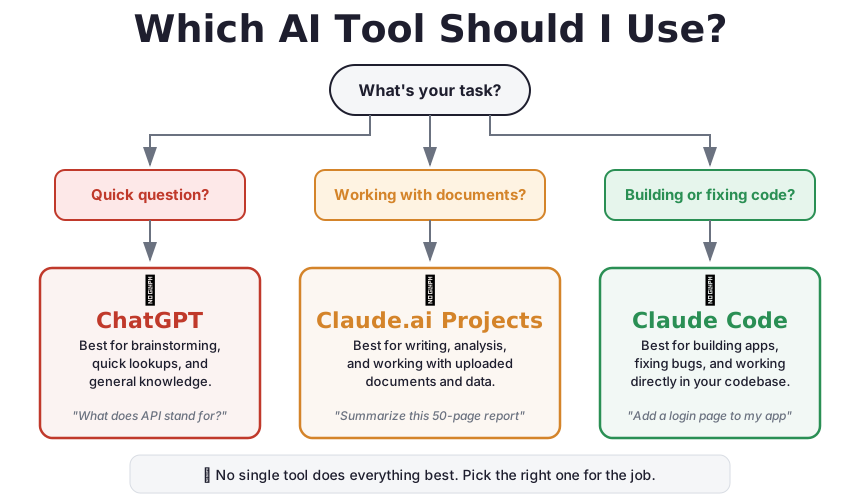
Different tasks call for different tools. Here's a simple guide:
You don't need to pick one. Most professionals use a mix of tools depending on the task.
Choosing Tools
Which AI Tool Should I Use?
Start with your task, and the right tool becomes obvious.
Writing & Communication
Your AI-powered writing assistant
Email Drafting
Turn bullet points into polished emails in seconds.
You write
- need to decline the vendor meeting
- too busy this week
- suggest next Tuesday instead
- keep it friendly
AI writes
Subject: Re: Vendor Meeting

Hi Sarah,

Thank you for setting this up. Unfortunately,
I won't be able to make it this week due to
a packed schedule.

Would next Tuesday at the same time work?
I'd love to connect then.

Best,
[Your name]
Prompt: "Turn these bullet points into a professional but friendly email declining a meeting."
Reports & Documents
Turn rough notes into structured, professional documents.
Here are my notes from the client meeting with Acme Corp:

- They want to launch in March, not April
- Budget increased to $50K
- Need mobile app first, web app later
- CEO concerned about security
- They loved the demo

Turn this into a professional meeting summary with
sections for Key Decisions, Action Items, and Next Steps.
In 10 seconds, you get a formatted document that would have taken 20 minutes to write.
Editing & Proofreading
Paste your draft and get instant, detailed feedback.
Review this email for clarity, grammar, and tone.
Suggest specific improvements. Tell me if anything
could be misinterpreted.

[paste your draft here]
- Catches grammar and spelling issues
- Flags unclear or ambiguous phrasing
- Suggests better word choices
- Identifies tone mismatches
AI as your personal editor, available 24/7, never gets tired.
Tone Adjustment
Same message, different tone. Incredibly useful for sensitive communications.
Formal
"I wanted to bring to your attention that the project timeline requires immediate revision due to recent scope changes."
Casual
"Hey, heads up, we need to adjust the timeline. The scope changed and we need to figure out new dates."
Diplomatic
"I'd like to discuss an opportunity to revisit our timeline. With the recent scope adjustments, there may be ways to better align our delivery expectations."
Urgent
"We need to revise the project timeline immediately. The scope changes impact our delivery date and we must realign by EOD Friday."
Prompt: "Rewrite this message in a [tone] tone."
Presentations & Slides
Generate outlines, talking points, and speaker notes in seconds.
Create a 10-slide outline for a presentation about our
Q4 results. Audience is the executive team. Include:
- Revenue highlights
- Customer growth metrics
- Challenges faced
- Q1 priorities

For each slide, give me the title, 3-4 bullet points,
and brief speaker notes.
This gets you 80% of the way. Add your specific data and personal insights for the final 20%.
Building Writing Templates
Create reusable templates for things you write regularly.
Weekly Update
Status, blockers, priorities for next week
Project Proposal
Problem, solution, timeline, budget, team
Meeting Agenda
Objectives, topics, time allocation, prep
Ask AI to create the template once. Then just fill in the blanks each time. Consistency + speed.
Data & Analysis
Making sense of numbers and information
Spreadsheet Formulas
Stop Googling formulas. Just describe what you need.
The Prompt
Write an Excel formula that calculates
the running average of column B, but
only counts non-empty cells. Put it
in column C.
The Result
=AVERAGE(B$1:B1)

Or for non-empty only:
=AVERAGEIF(B$1:B1,"<>")
This works for Excel, Google Sheets, and any spreadsheet tool. Just specify which one you're using.
Quick Data Analysis
Paste a table of data and ask AI to find patterns.
Here's our monthly sales data for 6 products over Q3-Q4:

[paste data table]

What are the trends? Which products are growing fastest?
Are there any anomalies or concerning patterns?
Present findings with specific numbers.
You get instant analysis that would take an analyst hours. Great for quick sanity checks and first-pass insights.
Summarizing Long Documents
Turn 50-page reports into 1-minute reads.
Summarize this report in 5 bullet points.
Focus on: key findings, recommendations, and
anything that requires immediate action.

Flag anything that seems unusual or contradictory.

[paste or upload document]
- Board reports → executive summary
- Legal contracts → key terms and obligations
- Research papers → main findings and methodology
- Policy documents → what changed and what it means for us
Comparing Options
Turn complex decisions into clear comparison tables.
Compare these 3 project management tools for a
25-person marketing team:
- Asana
- Monday.com
- ClickUp

Compare on: pricing, ease of use, integrations,
reporting, and mobile app quality.
Create a comparison table with a recommendation.
Works for vendors, software, strategies, job candidates, office spaces, and any multi-option decision.
Visualization Ideas
AI can suggest how to present your data visually.
Ask for advice
I have monthly revenue data for 4 product
lines over 2 years. What's the best chart
type to show the trend and comparison?
Get code
Create a bar chart of this data using
Google Sheets. Give me step-by-step
instructions to build it.
AI can generate chart specifications, suggest visualization types, and even write the code to create them.
Research & Learning
Your personal research assistant
Learning New Topics
Get explanations tailored to your level and perspective.
Generic
What is blockchain?
Tailored
Explain blockchain to me like I'm a
business executive, not a programmer.
Focus on the business implications and
potential use cases in supply chain
management. Skip the cryptography details.
The key is telling AI your role and what you need to do with the information. It adjusts the explanation accordingly.
Tackling Long Documents
Contracts, policies, research papers: get to the point fast.
Contracts
What are the 5 most
important clauses?
What are my
obligations?
Policies
What changed from the
previous version? What
do I need to do
differently?
Research
What's the main finding?
How strong is the
evidence? Any
limitations?
Always verify critical details in the original document. AI summaries are a starting point, not a replacement for reading key sections.
AI as a Thinking Partner
Use AI to stress-test your decisions and find blind spots.
Here's a description of a company we're considering
as a vendor:

[paste company info]

What questions should I be asking that I might not
have thought of? What are potential red flags?
What due diligence steps would you recommend?
AI won't make the decision for you, but it will make sure you've thought about the right questions.
Quick Catch-Up
Get up to speed on topics that have changed since you last looked.
Industry changes
Summarize the key changes in GDPR
compliance requirements since 2023.
What do I need to know as a
marketing director?
Technology updates
What are the most important changes
in Google Analytics in the last 6
months? Focus on features that
affect marketing reporting.
Remember: AI knowledge has a cutoff date. For very recent changes, verify with official sources.
Organization & Productivity
Systems that save you hours
Meeting Notes to Action Items
Transform raw meeting notes into structured, actionable summaries.
Turn these meeting notes into a structured summary:

[paste raw notes]

Include sections for:
- Key decisions made
- Action items (with owner and deadline)
- Open questions
- Next meeting agenda items
Record meetings (with consent), transcribe, then use this prompt. You'll never lose an action item again.
Project Planning
Break down big projects into manageable plans.
Break down this project into phases with milestones:

Project: Redesign our company website
Timeline: 3 months
Team: 2 designers, 1 developer, 1 project manager

Include estimated effort per phase, dependencies,
and potential risks with mitigation strategies.
This gives you a solid first draft. Adjust based on your team's specific capabilities and constraints.
Process Documentation
Capture institutional knowledge before it walks out the door.
Document the steps for our client onboarding process.
Write it so a new team member could follow it on their
first day. Include:
- Step-by-step instructions
- Who is responsible for each step
- Common pitfalls and how to avoid them
- Links/tools needed (I'll fill these in)
- SOPs for recurring processes
- Onboarding guides for new hires
- Runbooks for incident response
- Checklists for quality assurance
Task Prioritization
Let AI help you sort through an overwhelming to-do list.
Here are my 15 tasks for this week:

[list your tasks]

Help me prioritize by impact and urgency.
Suggest what I should delegate.
Suggest what I should defer to next week.
Block out a rough schedule for the top priorities.
Impact vs Effort
AI can map your tasks into a 2x2 matrix: high impact/low effort (do first), high impact/high effort (schedule), low impact/low effort (delegate), low impact/high effort (drop).
Time blocking
AI can suggest a realistic daily schedule based on task duration and your energy patterns.
Templates for Everything
Build templates once, use them forever.
Client Onboarding
Checklist from first call to project kickoff
Weekly Report
Status, metrics, blockers, next steps
Post-Mortem
What happened, why, how to prevent it
Hiring Rubric
Evaluation criteria, scoring guide
Budget Proposal
Costs, justification, ROI projection
Event Planning
Timeline, vendors, logistics checklist
Prompt: "Create a reusable template for [process]. Include all the sections someone would need to fill in."
Picking Your Tool
Which AI tool for which task
Tool Comparison
| Task Type | Best Tool | Why |
|---|---|---|
| Quick questions, brainstorming | ChatGPT or Claude.ai | Fast, conversational, no setup |
| Long documents, research | Claude.ai Projects | Upload files, persistent context |
| Writing & editing | Claude.ai | Large context window, strong writing |
| Building software | Claude Code | Reads/writes files, runs commands |
| Data analysis | ChatGPT (Code Interpreter) or Claude.ai | Can run Python, process CSVs |
| Multi-step file work | Claude Code | Terminal access, project awareness |
Privacy & Security
Be thoughtful about what you share with AI tools.
Key Rules
- Never paste passwords, API keys, or credentials
- Check your company's AI usage policy
- Be careful with confidential client data
- Understand what gets stored vs. what's ephemeral
- When in doubt, anonymize the data first
Most AI tools process but don't store your data by default. But company policies may have additional restrictions.
Cost Considerations
Free Tiers
ChatGPT free, Claude.ai free. Great for occasional use. Limited messages per day.
Paid Plans
ChatGPT Plus ($20/mo), Claude Pro ($20/mo), Claude Max ($100/mo). Unlimited or higher limits.
API Usage
Pay per message. Claude Code uses the API. Typical cost: $5-50/month depending on usage.
Start with free tiers. Upgrade when you hit limits regularly. Most daily tasks work fine with basic paid plans.
Start Tomorrow
Pick ONE task from today's lesson. Try it this week.
5 minutes
Draft an email using AI. Compare it to what you'd write manually.
10 minutes
Summarize a long document or report you've been putting off.
15 minutes
Create a template for a task you do weekly.
The habit starts with one task. Don't try to change everything at once.
The AI-Assisted Professional
You're not being replaced by AI. You're becoming more effective with AI.
The gap between "AI-assisted" and "not" will only grow. The professionals who learn to work with AI now will have a significant advantage.
Today
AI saves you 30 minutes a day on writing, analysis, and organization.
Tomorrow
AI handles the routine so you can focus on strategy, relationships, and creative work.
Key Takeaways
- AI works for far more than coding: writing, analysis, research, organization
- Start with writing and analysis, the fastest ROI
- Always review AI output. You own the final result
- Build reusable templates for consistency at speed
- Choose the right tool for the task. No single tool does everything
Lesson 5
AI for Daily Workflows
ChatGPT / Claude.ai
Quick tasks & questions
Claude.ai Projects
Documents & research
Claude Code
Building & files
Start with one task. Build from there.