A presentation for professionals
From ChatGPT to
Claude Code
Understanding AI, Language Models, and the Future of Software
Press → to begin
Context
Why Are We Here?
The shift
- AI went from research labs to every desktop
- ChatGPT reached 100M users in 2 months
- Every industry is being reshaped
- Finance is especially impacted
Today's goal
- Understand what AI/LLMs actually are
- Know the key concepts and vocabulary
- See how AI writes & understands code
- Learn about Claude Code extensibility
Part 1: Foundations
What Is Artificial Intelligence?
Software that can perform tasks that normally require human intelligence.
Perception
See images, hear speech, read text
Reasoning
Analyze, compare, draw conclusions
Generation
Write text, create code, produce content
Types of AI You'll Encounter
| Type | What It Does | Example |
|---|---|---|
| Traditional ML | Finds patterns in structured data | Fraud detection, credit scoring |
| Computer Vision | Understands images and video | Document scanning, ID verification |
| Speech AI | Converts speech ↔ text | Call center transcription |
| Large Language Models | Understands and generates text & code | ChatGPT, Claude, Gemini |
Today we focus on Large Language Models (LLMs), the technology behind ChatGPT and Claude.
What Is a Large Language Model?
An LLM is software trained on enormous amounts of text to understand and generate human language.
How it's built
- Collect billions of pages of text (books, websites, code)
- Train a neural network to predict "what comes next"
- Fine-tune it to be helpful, harmless, and honest
- Result: a system that can converse, analyze, and create
Key properties
- General purpose: not built for one task
- Natural language: you talk to it in English
- Context-aware: remembers the conversation
- Probabilistic: generates likely responses, not exact lookups
A Simple Analogy
Think of an LLM as the world's most well-read intern.
- Has read nearly everything ever published
- Can summarize, translate, explain, and draft
- Works incredibly fast, 24/7
- Sometimes gets things wrong with great confidence
- Needs clear instructions to do its best work
- Gets better when you give it context about your work
The quality of the output depends heavily on the quality of your prompt, meaning what you ask and how you ask it.
Key Vocabulary
| Term | Plain English |
|---|---|
| Prompt | The question or instruction you give the AI |
| Context | Background information the AI uses to answer better |
| Token | A chunk of text (~¾ of a word). How AI measures length |
| Context Window | How much text the AI can "see" at once (like working memory) |
| Hallucination | When the AI makes something up that sounds plausible but is wrong |
| Model | The trained AI system itself (GPT-4, Claude, etc.) |
| Fine-tuning | Additional training to specialize the model for a specific use |
| API | A way for software to talk to the AI programmatically |
The Major Players
🌟
OpenAI
ChatGPT, GPT-4
First to go mainstream. Backed by Microsoft.
◈
Anthropic
Claude
Focus on safety & reliability. Claude Code for developers.
◆
Gemini
Integrated into Google products. Multimodal.
What Can LLMs Actually Do?
Great at
- Summarizing documents & reports
- Drafting emails, memos, presentations
- Explaining complex concepts simply
- Analyzing and transforming data
- Writing, reviewing, and debugging code
- Translating between languages
- Brainstorming and ideation
Not great at
- ✗ Guaranteed factual accuracy
- ✗ Real-time information (without tools)
- ✗ Complex math with exact precision
- ✗ Accessing your private systems (without integration)
- ✗ Replacing human judgment on critical decisions
- ✗ Understanding context it hasn't been given
LLMs in Finance: Today
Already happening
- Automated report generation
- Regulatory document analysis
- Customer service chatbots
- Code generation for quant models
- Risk assessment summarization
- Internal knowledge search
Emerging
- AI-assisted due diligence
- Automated compliance checking
- Natural language database queries
- Portfolio commentary drafting
- Contract review & extraction
- Anomaly detection explanations
Part 2: From Chat to Code
The Evolution of AI Tools
Each step gives the AI more context and more capability.
ChatGPT / Claude.ai
You paste code into a chat window. The AI responds. You copy-paste back. Works, but lots of back-and-forth.
Claude Code
The AI lives inside your project. It reads your files, runs commands, edits code directly. It's a collaborator, not a chatbot.
Wait, What Is "Code"?
Code is instructions written for a computer in a language it can understand.
Human language
Calculate the total revenue
for Q4 2025 and show it
as a formatted table.
Code (Python)
revenue = df[df['quarter'] == 'Q4-2025']
total = revenue['amount'].sum()
print(f"Q4 Revenue: ${total:,.2f}")
The Terminal: Your Computer's Text Interface
Most people interact with computers through graphical interfaces, clicking buttons, dragging files.
A terminal (or command line) lets you control the computer by typing text commands.
Developers use it because it's faster, more precise, and automatable.
Terminal
$ ls project/
README.md  src/  tests/  package.json

$ claude
Claude Code v1.0
Ready. What would you like to do?

> Find all files that handle
  user authentication and
  explain how they work

Searching your codebase...
Part 3: Claude Code
What Is Claude Code?
An AI coding agent that lives in your terminal. Made by Anthropic (the company behind Claude).
Reads
Explores your entire codebase, understands file relationships
Writes
Creates and edits files directly in your project
Runs
Executes commands, runs tests, installs packages
Think of it as: a senior developer sitting next to you, with access to your project files, who never gets tired.
ChatGPT vs Claude Code
| ChatGPT / Claude.ai | Claude Code | |
|---|---|---|
| Where | Web browser | Your terminal, in your project |
| Context | Only what you paste in | Your entire codebase |
| Edits files | No, gives you text to copy | Yes, edits directly |
| Runs code | Limited sandbox | Full access to your tools |
| Remembers project | No (fresh each chat) | Yes (via CLAUDE.md) |
| Connects to tools | Limited plugins | MCP servers (GitHub, DBs, etc.) |
| Customizable | Minimal | Skills, hooks, plugins |
| Best for | Quick questions, drafting | Real development work |
How Claude Code Works
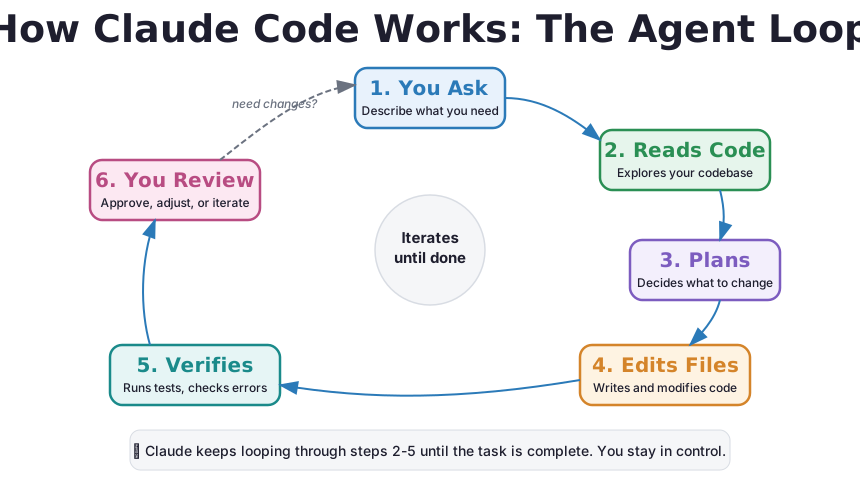
A simple loop:
You stay in control at every step. Claude asks for permission before making changes.
The Agent Loop, Visualized
Claude Code doesn't just answer once. It keeps working in a loop until the job is done.
Core Concepts
Context Is Everything
The #1 factor determining AI quality is how much relevant context you provide.
Bad: no context
You: "Fix the bug"

AI: "What bug? In what project?
     What language? What file?"
The AI is guessing.
Good: rich context
You: "Fix the login bug"

[Claude Code already knows:]
- Your tech stack (React + Node)
- The auth system (JWT tokens)
- Recent git changes
- The error in the logs
The AI gives a precise fix.
This is why Claude Code exists. It gives the AI automatic access to your entire project as context.
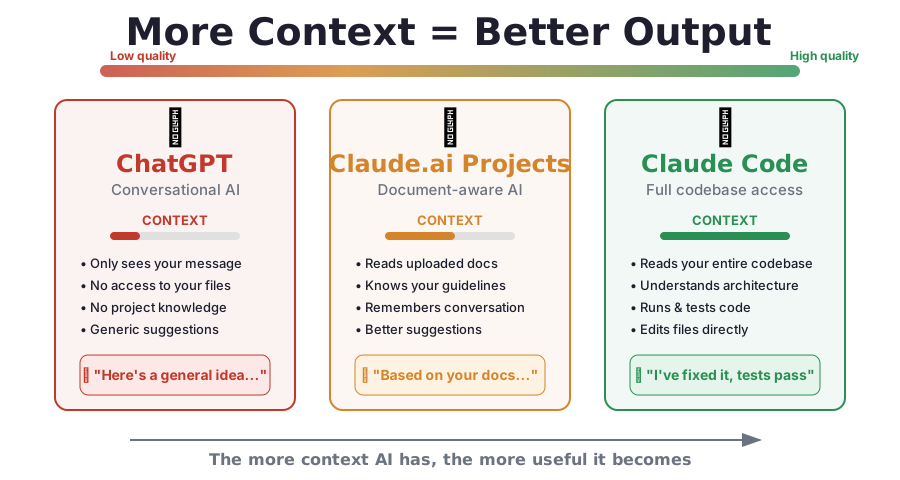
More Context = Better Output
Each generation of AI tools gives the model more context, and dramatically better results.
The Art of Prompting
How you ask determines what you get. A few principles:
Vague prompt
"Make this better"
Better how? Faster? Prettier? More secure? The AI guesses.
Clear prompt
"Add input validation to the
login form. Check that email
is valid and password is at
least 8 characters. Show
error messages below each field."
Prompting principles
- Be specific: say exactly what you want
- Give context: explain the "why" not just the "what"
- Set constraints: "use Python", "keep it under 50 lines", "follow our style guide"
- Iterate: refine based on the output, don't expect perfection on attempt #1
Tokens & Context Windows
What's a token?
AI doesn't read words. It reads tokens. A token is roughly ¾ of a word.
"The quarterly revenue report"

= 4 tokens:
  [The] [quarterly] [revenue] [report]

"$1,234,567.89"

= 6 tokens:
  [$] [1] [,234] [,567] [.89]
What's a context window?
The maximum amount of text the AI can "see" at once. Think of it as working memory.
| Model | Context Window | Roughly |
|---|---|---|
| GPT-4 | 128K tokens | ~200 pages |
| Claude | 200K tokens | ~300 pages |
| Gemini | 1M tokens | ~1500 pages |
Bigger window = can work with more code at once.
AI Tools: Giving AI Hands
By default, an LLM can only talk. Tools let it take actions.
Read files
Look at your project code and documents
Edit files
Make changes to existing code
Run commands
Execute scripts, install packages, run tests
Search
Find files and patterns in your codebase
Web access
Fetch documentation or API data
Integrations
GitHub, databases, Slack, etc.
Claude Code comes with all of these built in. You can add more via MCP servers.
What Is an AI Agent?
An agent is an AI that can plan, use tools, and complete multi-step tasks on its own.
Chatbot (basic)
You ask → it answers → done.
One question, one response. No actions taken.
Agent (Claude Code)
You ask → it thinks → reads files → plans → edits code → runs tests → fixes errors → reports back.
Multi-step, autonomous, uses tools along the way.
Safety & Permissions
Claude Code asks before it acts. You're always in control.
Permission model
- Claude asks before running commands
- You approve or deny each action
- You can pre-approve safe actions
- You can block dangerous actions permanently
Example
Claude wants to run:
npm test

[Allow]  [Deny]  [Always allow]
"Always allow" means you won't be asked again for npm test.
For finance teams: this permission model is critical. You can enforce policies about what the AI can and cannot do in your codebase.
Part 4: Extensibility
Making Claude Code
Your Own
5 ways to customize and extend Claude Code
Feature 1 of 5
CLAUDE.md: Project Memory
A file that tells Claude everything about your project so it doesn't have to ask.
Without CLAUDE.md
You: "Run the tests"
AI: "What test framework?
     What command?
     Where are the tests?"

You: "Jest. npm test. In /tests"
AI: "Got it..."

(Repeat every session)
With CLAUDE.md
You: "Run the tests"
AI: "Running npm test..."

Claude already knows:
- Framework: Jest
- Command: npm test
- Location: /tests
- Style: 2-space indent
- Language: TypeScript
CLAUDE.md
What It Looks Like
# Risk Analytics Platform

## Tech Stack
- Python 3.11, FastAPI
- PostgreSQL 15
- React frontend

## Commands
- `make test`: Run all tests
- `make lint`: Code quality check
- `make deploy-staging`: Deploy

## Rules
- All monetary values use Decimal
- Never use floating point for money
- Require type hints on all functions
- Every endpoint needs auth middleware
Where to place it
./CLAUDE.md | Whole team sees it |
./CLAUDE.local.md | Only you see it |
~/.claude/CLAUDE.md | All your projects |
How to create it
claude
> /init

# Auto-generates based on
# your project structure!
CLAUDE.md
Modular Rules
For larger teams, organize rules into separate files:
Folder structure
your-project/
├── CLAUDE.md
└── .claude/
    └── rules/
        ├── code-style.md
        ├── security.md
        ├── api-standards.md
        └── compliance.md
All .md files in rules/ are loaded automatically.
Path-specific rules
# .claude/rules/api-standards.md
---
paths:
  - "src/api/**/*.py"
---

All API endpoints must:
- Validate input with Pydantic
- Log to the audit trail
- Return standard error format
- Require authentication
These rules only activate when Claude works on matching files.
Feature 2 of 5
Skills: Custom Slash Commands
Turn any workflow into a reusable /command.
🔄
Without skills
You type the same detailed instructions every time you want Claude to review code, deploy, or run a specific workflow.
⚡
With skills
Type /review and Claude already knows exactly what to check, how to format the output, and what standards to follow.
Skills
Creating a Skill
Create a file at .claude/skills/review/SKILL.md:
---
name: review
description: Review code for quality
user-invocable: true
argument-hint: "[file]"
---

Review the specified code for:

1. Bugs: logic errors, edge cases
2. Security: injection, auth issues
3. Performance: slow queries, leaks
4. Style: naming, readability

For each issue:
- State the problem
- Show the line
- Suggest a fix
Usage
# In Claude Code, just type:
> /review
> /review src/auth.py
Where skills live
.claude/skills/ | Project (shared) |
~/.claude/skills/ | Personal (all projects) |
Pro features
$ARGUMENTS: pass parameters!`command`: inject shell outputcontext: fork: run in isolation
Skills
Skills for Finance Teams
/audit-check
Review code changes for compliance with SOX, PCI-DSS, or internal audit requirements.
/data-quality
Validate data pipeline code ensures no silent data loss, null handling, and type safety.
/explain-model
Generate plain-English documentation for quantitative models and algorithms.
/security-scan
Check for hardcoded credentials, insecure API calls, and data exposure risks.
/migration
Plan and execute database schema changes with rollback strategies.
/incident-report
Generate an incident report from git logs and error traces.
Skills encode your team's best practices so everyone follows them consistently.
Feature 3 of 5
MCP Servers: External Integrations
Connect Claude to the tools your team already uses.
MCP = Model Context Protocol, a standard way for AI to talk to external services.
The MCP server acts as a bridge. Claude talks to it using a standard protocol.
MCP Servers
Adding an MCP Server
Cloud service (one command)
# Connect to GitHub
claude mcp add \
  --transport http \
  github \
  https://api.githubcopilot.com/mcp/

# Then authenticate:
> /mcp
Now Claude can create PRs, review code, manage issues.
Database (local)
# Connect to PostgreSQL
claude mcp add \
  --transport stdio \
  mydb \
  -- npx -y @bytebase/dbhub \
  --dsn "postgresql://..."
Now Claude can query your database in natural language.
--scope project to save the config in .mcp.json, which you commit to git. Everyone gets the same integrations.
MCP Servers
What Can You Connect?
🐙
GitHub
PRs & issues
🗃
PostgreSQL
Database queries
🚨
Sentry
Error tracking
💬
Slack
Messaging
📝
Notion
Knowledge
📋
Jira
Project mgmt
💳
Stripe
Payments
🔧
Custom
Build your own
Real conversation with MCP:
You: "What were the top 5 errors in production this week?"
Claude: [queries Sentry via MCP, analyzes results]
       "Here are the top 5 errors, ranked by frequency..."

You: "Fix the most common one"
Claude: [reads the stack trace, finds the file, edits the code, runs tests]
Feature 4 of 5
Hooks: Automated Triggers
Scripts that run automatically when events happen in Claude Code.
Like setting up rules: "Whenever X happens, do Y."
When can hooks fire?
- Before Claude uses a tool
- After Claude edits a file
- When you submit a prompt
- When Claude finishes responding
- When a session starts
What can they do?
- Auto-format code after changes
- Block edits to sensitive files
- Send notifications
- Run tests automatically
- Log all commands for auditing
Hooks
Examples
Auto-format after every edit
{
  "hooks": {
    "PostToolUse": [{
      "matcher": "Edit|Write",
      "hooks": [{
        "type": "command",
        "command": "prettier --write"
      }]
    }]
  }
}
Every time Claude edits a file, it gets auto-formatted.
Block editing .env files
{
  "hooks": {
    "PreToolUse": [{
      "matcher": "Edit|Write",
      "hooks": [{
        "type": "command",
        "command": "... | grep '.env'
          && exit 2 || exit 0"
      }]
    }]
  }
}
exit 2 = block the action. Protects secrets.
Hooks
All Hook Events
| Event | When | Blocks? | Use case |
|---|---|---|---|
PreToolUse | Before any tool runs | Yes | Protect files, enforce policies |
PostToolUse | After tool succeeds | No | Format, lint, log changes |
UserPromptSubmit | You hit Enter | Yes | Input validation, injection checks |
Stop | Claude finishes | Yes | Verify all tasks completed |
SessionStart | Session begins | No | Load environment, greet |
SessionEnd | Session ends | No | Cleanup, save state |
Notification | Permission prompt | No | Desktop notification |
Configure in .claude/settings.json or interactively with /hooks.
Feature 5 of 5
Plugins: Shareable Extension Packs
Bundle skills + hooks + integrations into one installable package.
What's in a plugin?
- Skills: slash commands
- Hooks: automated triggers
- MCP Servers: integrations
- Agents: specialized sub-agents
Any or all of these. A plugin can be simple (one skill) or comprehensive.
Why plugins?
- Share workflows with your team
- Version your extensions
- Distribute via a marketplace
- Enforce standards across projects
Plugins
Plugin Structure
my-plugin/
├── .claude-plugin/
│   └── plugin.json      ← manifest
├── skills/
│   ├── review/SKILL.md
│   └── deploy/SKILL.md
├── hooks/
│   └── hooks.json
├── agents/
│   └── analyzer.md
└── .mcp.json            ← integrations
Manifest (plugin.json)
{
  "name": "finance-toolkit",
  "description": "Finance team
    standards & workflows",
  "version": "1.0.0"
}
Install & use
# Test locally
claude --plugin-dir ./my-plugin

# Or install from marketplace
> /plugin install
Plugins
When to Use What?
| Scenario | Best approach |
|---|---|
| Quick project notes | CLAUDE.md Just write a CLAUDE.md |
| One reusable workflow | Skill Create a single SKILL.md file |
| Connect to a service | MCP Add an MCP server |
| Automatic code formatting | Hook Add a PostToolUse hook |
| Enforce security policies | Hook Add a PreToolUse hook |
| Share all of the above with your team | Plugin Bundle into a plugin |
| Distribute to the community | Plugin + marketplace |
Start simple. You can always package things into a plugin later.
Bonus
Settings & Permissions
Fine-grained control over what Claude can do:
Allow safe operations
{
  "permissions": {
    "allow": [
      "Bash(npm test *)",
      "Bash(git status)",
      "Read(./src/**)"
    ]
  }
}
Block dangerous operations
{
  "permissions": {
    "deny": [
      "Bash(rm *)",
      "Read(.env*)",
      "Bash(curl *)",
      "Read(./secrets/**)"
    ]
  }
}
Part 5: Real World
Putting It All Together
A day in the life with Claude Code
Scenario: Risk Analytics Platform
Your team builds internal risk analytics tools. Here's how Claude Code fits in:
9:00 AM: Start session
Claude loads CLAUDE.md, knows your stack, compliance rules, and team conventions.
9:15 AM: Code review
Type /review src/risk_engine.py. Skill runs automated review checking for bugs, security, and your internal standards.
10:00 AM: Bug from production
Claude queries Sentry (via MCP) for the error, reads the stack trace, finds the bug, and proposes a fix.
11:00 AM: Automated checks
Hooks auto-format every file Claude edits, block changes to production configs, and log all commands to audit trail.
2:00 PM: New team member
They install the team plugin. Instantly get all skills, hooks, and integrations. Productive from day one.
Finance-Specific Use Cases
Compliance & Audit
- Auto-check code against regulatory rules
- Generate audit logs of all AI actions
- Block modifications to sensitive data paths
- Ensure all monetary calculations use Decimal
Data & Analytics
- Query databases in plain English
- Generate reports from data pipelines
- Validate data quality checks
- Document quantitative models
Development Velocity
- Onboard new developers instantly
- Standardize code review process
- Automate repetitive development tasks
- Reduce context-switching overhead
Risk Management
- Review changes to pricing models
- Enforce permission boundaries
- Detect code that touches PII
- Ensure test coverage on critical paths
Security Considerations
Built-in safeguards
- Permission prompts for every action
- Allow/deny lists for tools and files
- Enterprise managed settings
- MCP server access controls
- Hooks for policy enforcement
- Audit logging capabilities
Best practices
- Never commit secrets in CLAUDE.md
- Use
denyrules for sensitive files - Use read-only DB connections for MCP
- Review Claude's changes before deploying
- Enable command logging hooks
- Use managed settings for org policies
Architecture Overview
Your Project
CLAUDE.md: context
Skills: commands
Hooks: automation
Settings: permissions
Claude Code
AI Agent
Reads, writes, runs commands
Plans and executes
Asks for permission
External
MCP: GitHub
MCP: Database
MCP: Sentry
Plugins
Getting Started: 5 Steps
-
Install Claude Code
npm install -g @anthropic-ai/claude-code(requires Node.js) -
Navigate to your project & launch
cd my-project && claude -
Create project memory
/init(auto-generates CLAUDE.md) -
Add an integration
claude mcp add --transport http github https://api.githubcopilot.com/mcp/ -
Create your first skill
Create.claude/skills/review/SKILL.mdand start using/review
Pricing & Cost
How it works
- Claude Code uses the Anthropic API
- You pay per token (input + output)
- Or use Claude Max/Team/Enterprise plans
- Check usage anytime with
/cost
Controlling costs
- Use
/compactto reduce context size - Skills with
context: forkuse separate context - Use smaller models for simple tasks
- Set spending limits in your account
Common Questions
| Question | Answer |
|---|---|
| "Is our code sent to the cloud?" | Code is sent to Anthropic's API for processing. Enterprise plans offer enhanced data privacy. Nothing is used for training. |
| "Can it access production?" | Only what you configure. Use read-only DB connections. Use deny rules for sensitive paths. |
| "Will it replace developers?" | No. It's a productivity multiplier. Developers still design, review, and make decisions. |
| "How accurate is it?" | Very good, but not perfect. Always review changes, especially for financial calculations. |
| "Can we use it offline?" | No. It requires an internet connection to reach the API. |
Tool Comparison
| ChatGPT | GitHub Copilot | Claude Code | |
|---|---|---|---|
| Type | Chatbot | Autocomplete | Agent |
| Where | Browser | IDE plugin | Terminal |
| Reads codebase | No | Current file | Entire project |
| Edits files | No | Suggestions | Direct edits |
| Runs commands | Sandbox | No | Full access |
| External tools | Limited | No | MCP servers |
| Customizable | Minimal | Minimal | Skills, hooks, plugins |
| Multi-step tasks | Manual | No | Autonomous |
These tools complement each other. Many teams use multiple tools for different tasks.
Key Takeaways
- LLMs are pattern-matching engines trained on text. They understand and generate language, including code.
- Claude Code is an AI agent that lives in your project. It reads, writes, and runs, not just chats.
- Context is king. The more the AI knows about your project (CLAUDE.md), the better it performs.
- You stay in control. Permissions, hooks, and settings let you enforce exactly what's allowed.
- It's extensible. Skills, MCP servers, hooks, and plugins let you customize it for your team's needs.
- Start simple. Create a CLAUDE.md, try one skill, add one integration. Build from there.
Thank You
From ChatGPT to Claude Code
Questions?