Practical Guide
Understanding Software
What you need to know before building your first product
Use → to begin
Why This Matters
Whether you're a founder, product manager, or creative professional, understanding how software works helps you make better decisions.
You don't need to write code. But you need to understand what's being built, what it costs, and what can go wrong.
Knowledge is leverage. The more you understand, the better you can evaluate options, manage projects, and avoid costly mistakes.
What We'll Cover
| # | Section | Key topics |
|---|---|---|
| 1 | Software Fundamentals | What software is, how it runs, files and projects |
| 2 | Types of Software | Static sites vs. dynamic apps, the complexity spectrum |
| 3 | Programming Languages | What each language does, when you'll encounter them |
| 4 | Key Components | Frontend, backend, databases, APIs, Git, hosting |
| 5 | Building Quality Software | Testing, efficiency, scalability, clean code |
| 6 | What Can Go Wrong | Security, privacy, technical debt, support |
| 7 | Software Costs | Hosting, APIs, maintenance, realistic budgets |
| 8 | AI Coding Tools | What they can do, where they fall short |
| 9 | Planning and Next Steps | Business plan, learning path, key takeaways |
Fundamentals
What Is Software?
Software is a set of instructions that tell a computer what to do.
Think of it like a recipe
A recipe tells a cook how to make a dish, step by step. Code tells a computer how to perform a task, step by step. If a step is missing or wrong, the result is wrong too.
It's everywhere
Email, Instagram, banking apps, your car dashboard, smart TVs, traffic lights. All powered by software. Just instructions running on different hardware.
Fundamentals
What Is Programming?
Programming is the craft of writing those instructions in a language the computer understands.
Like writing sheet music. The musician (computer) plays exactly what is written. Nothing more, nothing less. If the notes are wrong, the music sounds bad. That's called a "bug."
Computers are extremely literal. They do exactly what the code says. Bugs happen when the instructions are incomplete, ambiguous, or simply wrong.
Fundamentals
How Software Runs
Runs locally
On your own computer or phone. Like Microsoft Word or a desktop app. Only you can see and use it.
Runs in the cloud
On a remote server somewhere. Like Gmail or Netflix. Anyone with access can reach it over the internet.
Most modern software combines both: something on your device, something on a remote server.
Fundamentals
Files, Folders and Projects
Software is organized in files and folders, just like documents on your computer.
A typical project
my-website/
  index.html          main page
  style.css           visual design
  app.js              interactivity
  package.json        project config
  images/
    logo.png
    hero.jpg
What this means
- A "codebase" is the collection of all project files
- Some files are logic, some are design, some are configuration
- You can open and read any file in a text editor
- Changes to one file can affect others
Fundamentals
The Invisible Parts
Beyond the visible code, every project has hidden components that make it work.
Configuration
Files like package.json or .env that control how the project behaves, what tools it uses, and what settings it needs.
Dependencies
Pre-built libraries the project relies on. Like buying ingredients from a store instead of growing them yourself. Saves time, creates reliance.
Environment Variables
Secret settings like API keys and passwords. These should never be shared publicly or committed to code repositories.
Important: A project might have hundreds of dependencies and several secret keys. Understanding what's in your project beyond the visible code is essential for security.
Fundamentals
Fundamentals Recap
You don't need to write code. But understanding these building blocks helps you make informed decisions about what gets built.
Types of Software
Not All Software Is the Same
A simple website and a full application are wildly different in complexity, cost, and risk.
Analogy: A flyer vs. a magazine vs. a newspaper with daily delivery. All "print," but very different operations, teams, and budgets.
Understanding where your idea falls on the spectrum determines everything: tools, timeline, cost, and team size.
Types of Software
Static Websites
A static website is a digital brochure. Same content for every visitor. No "brain" behind it.
What it is
- Built with HTML (structure) + CSS (style)
- Maybe a little JavaScript for interactivity
- No database, no user accounts, no backend
- Content is the same for every visitor
Examples
- Portfolio or personal website
- Restaurant menu page
- Product landing page
- Event invitation or info page
Cost to host: $0 to $5/month | Complexity: Low | Best for: Information display, marketing
Types of Software
Dynamic Websites and Web Applications
When content changes based on who is visiting or what they do, you need a server and a database.
Dynamic website
- A server processes each request
- Content is customized per visitor
- Requires a backend + database
- Example: news site, e-commerce store
Full web application
- User accounts, saved data, interactions
- Payments, real-time features, admin panels
- Multiple interconnected systems
- Example: Slack, Airbnb, Google Docs
Key difference from static: You now need a backend, a database, authentication, API integrations, and security. Each adds cost, complexity, and ongoing maintenance.
Types of Software
The Complexity Spectrum
| Each step up adds | What it means in practice |
|---|---|
| More code | More things that can break |
| More infrastructure | Servers, databases, services to manage |
| More cost | Monthly bills that grow with usage |
| More maintenance | Ongoing work that never stops |
| More expertise needed | Requires experienced developers and architects |
Types of Software
Mobile Apps and Beyond
Mobile apps
- Run on phones (iOS, Android)
- App store approval process required
- Device compatibility testing
- Push notifications, offline mode, permissions
- May need separate codebases per platform
Enterprise platforms
- Multiple services working together
- Teams of engineers to build and maintain
- Compliance, auditing, SLAs
- Think: Uber, Shopify, Salesforce
- Months or years to build properly
For most new projects, start with a web app. Mobile can come later as a wrapper around your existing product.
Programming Languages
The Language Landscape
There are hundreds of programming languages, but only about a dozen dominate the industry.
Analogy: Different tools in a workshop. A saw cuts wood, a drill makes holes, a sander smooths surfaces. Each programming language is designed for specific types of work. Using the wrong one makes everything harder.
You will hear these names in conversations, job postings, and project discussions. Here's what each one actually does.
Programming Languages
HTML and CSS
HTML - Structure
Defines what's on the page: headings, paragraphs, images, buttons, links, forms.
The skeleton and bones of a building.
<h1>Welcome</h1>
<p>This is a paragraph.</p>
<button>Click me</button>
CSS - Style
Defines how it looks: colors, fonts, spacing, layout, animations, responsive design.
The paint, furniture, and interior design.
h1 {
  color: navy;
  font-size: 2rem;
}
button {
  background: blue;
  border-radius: 8px;
}
Technically, HTML and CSS are not "programming languages." They are markup and styling. But every website uses them.
Programming Languages
JavaScript
The language of the web. If you're building anything for a browser, JavaScript is involved.
What it does
- Makes web pages interactive (clicks, animations, live updates)
- The only language that runs natively in web browsers
- Also runs on servers via Node.js
- Powers both frontend and backend
- Largest ecosystem of libraries and tools
What it looks like
// Show a greeting when button is clicked
function greet(name) {
  return `Hello, ${name}!`;
}

button.addEventListener('click', () => {
  alert(greet('World'));
});
Programming Languages
Python
The Swiss Army knife. Known for readability and used across many domains.
What it does
- Dominant in AI, machine learning, and data science
- Great for backend development
- Excellent for automation and scripting
- Beginner-friendly syntax
- Huge ecosystem of scientific and web libraries
What it looks like
# Calculate a discount
def apply_discount(price, percent):
    discount = price * (percent / 100)
    return max(price - discount, 0)

result = apply_discount(100, 15)
print(f"Final price: ${result}")
# Output: Final price: $85.0
Programming Languages
Languages and Frameworks Reference
| Name | Type | Used for | You'll see it when... |
|---|---|---|---|
| HTML | Markup | Page structure | Every website, always |
| CSS | Styling | Visual design, layout | Every website, always |
| JavaScript | Language | Web interactivity, full-stack | Any web project |
| TypeScript | Language | JavaScript with type safety | Professional/large projects |
| Python | Language | Backend, AI, data, automation | AI features, APIs, scripts |
| SQL | Query lang. | Talking to databases | Any app that stores data |
| React | Framework | Building user interfaces | Most modern web apps |
| Next.js | Framework | Full-stack React apps | Production web apps |
| Node.js | Runtime | Running JS on servers | Backend of web apps |
| Tailwind CSS | Framework | Utility-based styling | Modern UI development |
| Swift | Language | iOS and Mac apps | Apple platform development |
| Kotlin | Language | Android apps | Google platform development |
Programming Languages
How Languages Work Together
A typical web application uses multiple languages, each handling a different layer.
A single web application might use HTML, CSS, TypeScript, React, Node.js, SQL, and several APIs. Each has a specific job. Understanding these layers helps you evaluate technical decisions.
Key Components
Frontend vs. Backend
Frontend: The Dining Room
Everything the user sees and interacts with.
- Buttons, forms, layouts, animations
- Built with HTML, CSS, JavaScript
- Frameworks: React, Vue, Angular
- Runs in the user's browser
Backend: The Kitchen
The behind-the-scenes logic the user never sees.
- Processes requests, enforces rules
- Talks to databases and external services
- Built with Python, Node.js, Go, Java
- Runs on a server
A static website has no backend. The moment you need user accounts, saved data, or payments, you need both layers.
Key Components
The Client-Server Model
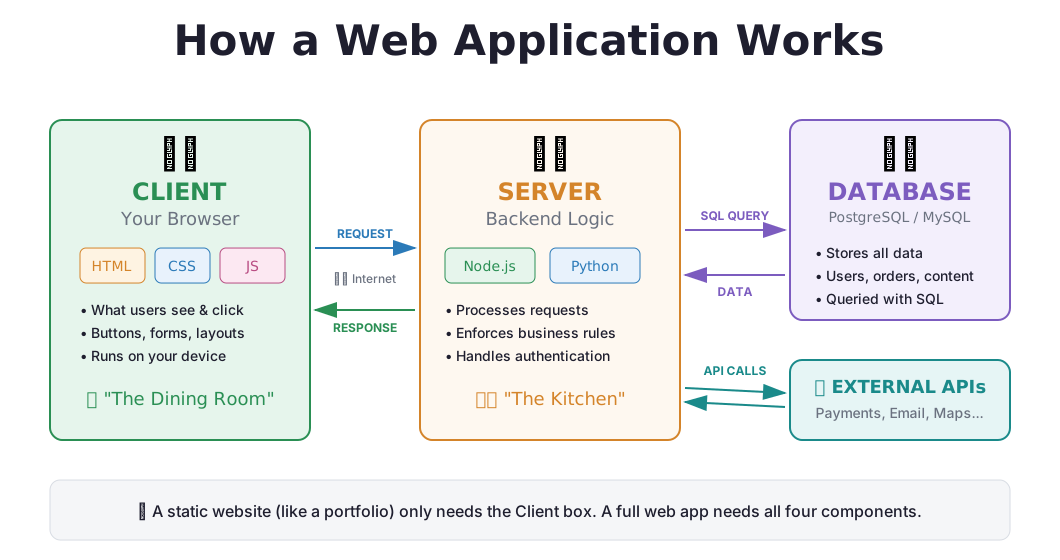
Every time you use a website or app, two computers are talking to each other.
Your device (laptop, phone, tablet)
Runs the browserDisplays the UI
Sends requests
A computer in a data center
Runs your backend codeReads/writes the database
Sends back data or pages
Client = frontend. It's the code that runs on the user's device. Server = backend. It's the code that runs on your machine in the cloud. They communicate over the internet.
Key Components
The Full Picture
A real web application has more than just a client and server. Here's how all the pieces fit together.
Key Components
What Happens When You Click "Place Order"
A single button click triggers a full round trip between client and server.
This all happens in milliseconds. Every interaction (logging in, searching, sending a message) follows this same request-response pattern.
Key Components
Where Does Code Actually Run?
This is the key insight: different code runs on different machines.
💻 Client-Side (User's Device)
- HTML, CSS, JavaScript
- Rendering the page layout
- Animations and visual effects
- Reacting to clicks and keystrokes
- Basic form validation
Anyone can inspect this code, right-click → "View Source" in any browser. Never put secrets here.
☁️ Server-Side (Your Server)
- Python, Node.js, Go, Java
- Checking passwords and permissions
- Processing payments
- Reading/writing the database
- Calling external APIs (Stripe, email, etc.)
This code is private. Users never see it. Passwords, API keys, and business logic live here.
Why does this matter? If you put a password check only on the client side, anyone can bypass it. Security-critical logic must always run on the server.
Key Components
What Is a Database?
A database is where your application remembers things.
Think of it as...
A very powerful, structured spreadsheet that code reads from and writes to automatically. Each table is like a sheet. Each row is a record. Each column is a field.
Common examples of stored data
- User profiles (name, email, password hash)
- Products (title, price, stock quantity)
- Orders (items, total, shipping address)
- Messages, settings, activity logs
If your app needs to remember anything between visits (user accounts, saved content, order history), you need a database. That's a significant step up in complexity and cost.
Key Components
SQL and How Data Is Stored
SQL (Structured Query Language) is how you talk to a database. It reads like English.
Reading data
-- Find all orders over $100
SELECT customer_name, total
FROM orders
WHERE total > 100
ORDER BY total DESC;

-- Count users by country
SELECT country, COUNT(*)
FROM users
GROUP BY country;
How data is structured
| id | name | role | |
|---|---|---|---|
| 1 | Alice | alice@mail.com | admin |
| 2 | Bob | bob@mail.com | user |
| 3 | Carol | carol@mail.com | user |
Tables with rows and columns, just like a spreadsheet. Tables can reference each other through relationships.
Key Components
Connections, Sessions and State
When users interact with your application, the system needs to manage connections and track who is who.
Database connections
- Each request to the database opens a connection
- Connections are limited and cost resources
- "Connection pooling" reuses connections efficiently
- Too many connections = database overload
User sessions
- When you log in, the server creates a "session"
- A token (cookie) identifies you on each request
- Sessions expire for security (that's why you get logged out)
- Managing sessions properly is critical for security
Why this matters: Connection management and session handling are invisible to users but essential to how software works. Poor management leads to slow performance, crashes, or security holes.
Key Components
What Is an API?
An API is how different pieces of software communicate with each other.
Analogy: A waiter in a restaurant. You (the app) give your order to the waiter (API). The waiter takes it to the kitchen (another service) and brings back your food (the response).
| When your app needs to... | It calls... | Which returns... |
|---|---|---|
| Process a payment | Stripe API | Payment confirmation |
| Send an email | SendGrid API | Delivery status |
| Show a map | Google Maps API | Map tiles and data |
| Authenticate a user | Google OAuth API | User identity |
| Get weather data | OpenWeather API | Temperature, forecast |
Each API typically charges per request. Costs add up as usage grows.
Key Components
Version Control with Git
Git tracks every change ever made to your code.
Like "Track Changes" in Google Docs, but for your entire project. Every edit is recorded: who did it, when, and why.
Undo button
Something broke? Revert to the last working version instantly. No work is ever truly lost.
History book
See exactly what changed, when, and why. Full audit trail of your entire project's evolution.
Collaboration
Multiple people can work on the same project. Git merges changes and resolves conflicts.
Key Components
Why Git Is Non-Negotiable
What Git gives you
- Branches let you experiment without risking working code
- Commits are checkpoints you can always return to
- Pull requests enable code review before changes go live
- Blame shows who wrote each line and when
GitHub / GitLab
- Cloud storage for your Git repositories
- Your laptop dying does not mean your project dies
- Free for personal and small team use
- Industry standard for all software teams
Rule of thumb: Never build anything without Git. It is the first thing you set up, and the thing that saves you when things go wrong.
Key Components
Frameworks and Libraries
Pre-built components that speed up development. Like IKEA furniture vs. building from raw wood.
Common frameworks
- React / Next.js - web user interfaces
- Express / FastAPI - backend servers
- Tailwind CSS - styling and design
- React Native - mobile apps from web code
- Django / Rails - full-stack web apps
The trade-off
- Every library is a dependency
- Dependencies can become outdated or abandoned
- Security vulnerabilities in a library affect your app
- Updating one can break others
- More dependencies = more risk over time
Key Components
Domains, Hosting and Deployment
Making your software accessible to the world requires three things.
Domain
Your internet addressmyapp.com
~$10-50/year
Hosting
A server that runs your app 24/7
$0-500+/month
Deployment
Moving code from your machine to the server
Can be automated via CI/CD
Static sites: free hosting on Netlify, Vercel, or GitHub Pages. Dynamic apps: paid services like Railway, Render, AWS, or Google Cloud.
Quality
Why Testing Matters
How do you know your software actually works?
Untested software is a ticking time bomb. It might work today. It might break tomorrow. Without tests, you won't know until a user reports it, or worse, until you lose data.
Testing answers these questions
- Does this feature do what it's supposed to?
- Does it handle unexpected inputs gracefully?
- Did fixing one thing break something else?
- Will this still work after the next change?
Quality
Types of Testing
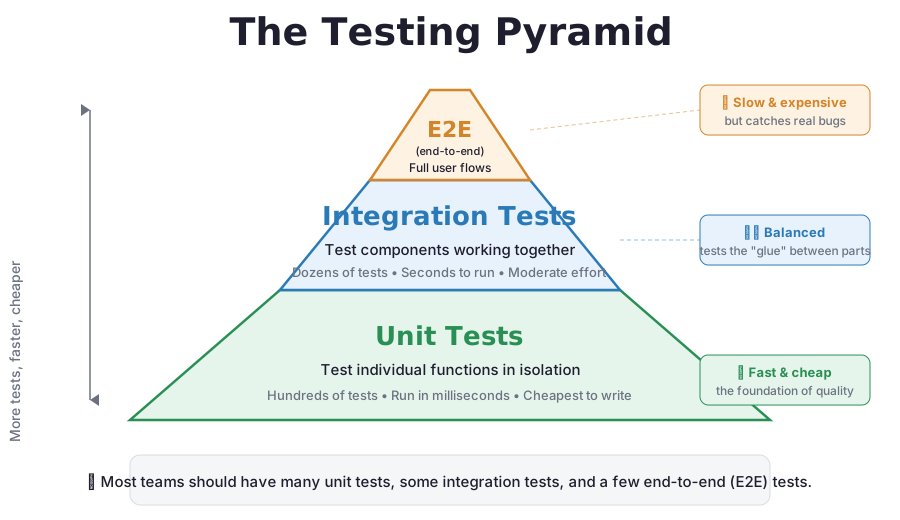
Unit tests
Test individual functions in isolation. Like checking each ingredient before cooking.
test("10% off $100", () => {
  expect(discount(100, 10))
    .toBe(90);
});
Integration tests
Test that pieces work together. Does the frontend correctly save data to the database?
The recipe produces a good dish, not just good ingredients.
End-to-end tests
Test the full user journey. User signs up, creates a profile, makes a purchase.
Simulates real behavior in a real browser.
At minimum: Every project should have unit tests for critical functions and manual testing for user flows. Skipping tests is borrowing time you'll pay back with interest.
Building Quality
The Testing Pyramid
Not all tests are equal. The pyramid shows how to balance speed, cost, and coverage.
Quality
Manual Testing Checklist
Before anything goes live, try to break it yourself.
| Try this | Why it matters |
|---|---|
| Submit empty forms | Does it handle missing data? |
| Enter very long text | Does the layout break? |
| Use special characters (!@#$%) | Could enable security attacks |
| Click buttons twice quickly | Does it double-submit? |
| Open it on your phone | Is it responsive? |
| Turn off internet and try | Does it fail gracefully? |
| Try a different browser | Does it work everywhere? |
| Log in as different users | Do permissions work correctly? |
Quality
Efficiency and Clean Code
Well-written code is easier to maintain, debug, and extend. It costs less in the long run.
Removing duplication
- The "DRY" principle: Don't Repeat Yourself
- Duplicated code means fixing the same bug in multiple places
- Shared functions reduce errors and save time
- Example: one validation function used everywhere, not copy-pasted code
Separation of concerns
- Each part of the code should have one job
- Display logic separate from business logic
- Data access separate from data processing
- Makes it possible to change one layer without breaking others
Quality
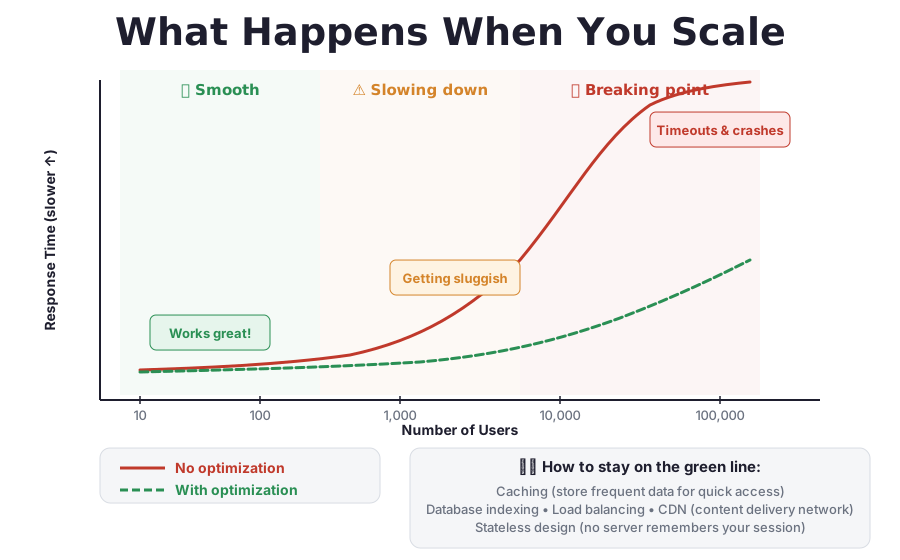
Building for Scale
Software that works for 10 users may collapse at 10,000. Scalability is the ability to grow gracefully.
What makes software scalable
- Efficient database queries - indexes, avoiding N+1 queries
- Caching - store frequent results to reduce load
- Stateless design - any server can handle any request
- Modular architecture - services can scale independently
Warning signs
- Page loads getting slower as data grows
- Database queries that scan entire tables
- Everything tightly coupled into one giant codebase
- No monitoring or alerting in place
Rule of thumb: Build for your current stage, but be aware of the next one. Don't build for 1 million users when you have zero, but don't paint yourself into a corner either.
Building Quality
What Happens When You Scale
Software that works for 10 users can break at 10,000 if you don't plan ahead.
What Can Go Wrong
Security Threats
Security vulnerabilities are invisible until someone exploits them. One breach can destroy trust and cost millions.
SQL Injection
Attackers insert malicious database commands through input fields. Can read, modify, or delete your entire database.
Cross-Site Scripting (XSS)
Malicious scripts injected into your pages. Can steal user sessions, redirect users, or deface your site.
Exposed Secrets
API keys or passwords accidentally committed to code. Attackers scan public repositories for these constantly.
Open Endpoints
Backend routes without proper authentication. Anyone can access or modify data without logging in.
What Can Go Wrong
Privacy and Compliance
If you collect user data, you are legally responsible for protecting it.
Regulations you must know
- GDPR (Europe) - fines up to 4% of annual revenue
- CCPA (California) - user data rights
- Data residency requirements by country
- Right to deletion requests
- Cookie consent and tracking disclosures
Real consequences
- Legal liability and potential fines
- Loss of user trust (permanent damage)
- Mandatory breach notifications
- Potential lawsuits
- Reputation damage that's hard to recover from
If your app stores personal data (names, emails, payments), you need legal and security review. This is not optional.
What Can Go Wrong
Code You Can't Support
Building fast is easy. Maintaining it when it breaks is the hard part.
Every piece of software breaks eventually. Servers go down. APIs change. Users find edge cases. Dependencies get vulnerabilities. The question is: can you fix it?
The problem
- You don't understand the architecture
- No documentation explaining how things work
- No tests to verify fixes don't break other things
- Original developer is unavailable
The prevention
- Keep your software as simple as possible
- Document key decisions and architecture
- Write tests for critical paths
- Have a technical person you can call
What Can Go Wrong
Code That's Not Flexible
Quick solutions often become expensive problems later.
Common problems
- Hardcoded values baked into the code instead of being configurable
- Tightly coupled logic where everything depends on everything else
- No reusability with the same code copied in multiple places
- Mixed concerns where business rules are tangled with display logic
The cost
- Adding a new feature requires rewriting existing ones
- Changing one thing breaks three other things
- What takes 1 hour to build takes 20 hours to modify
- Eventually, it's cheaper to start over from scratch
Ask the right questions early: "Is this solution flexible enough to change later?" and "What would need to change if we added feature X?"
What Can Go Wrong
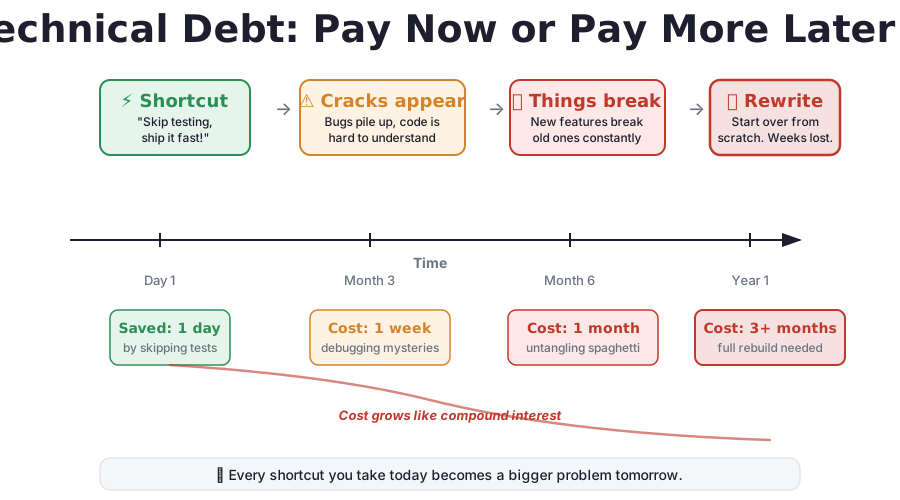
Technical Debt
Shortcuts that save time now but cost more later. Like credit card debt, it compounds.
| Shortcut taken | Future cost |
|---|---|
| No tests written | Bugs discovered by users, not developers |
| No security review | Data breach, legal action, user loss |
| No documentation | Can't maintain or hand off the project |
| No version control | Can't undo mistakes, work gets lost |
| No architecture planning | Full rewrite needed when you grow |
| Too many dependencies | Vulnerability exposure, update nightmares |
A quick demo is not a product. What takes 1 hour to build can take 100 hours to fix when it goes wrong in production.
What Can Go Wrong
Technical Debt, Visualized
Every shortcut has a price. Small savings today can become massive costs later.
Costs
Software Doesn't Come for Free
Building is the easy part. Running, maintaining, and scaling is where the money goes.
Understanding costs upfront prevents painful surprises later. Even free tools run on infrastructure that costs money as you scale.
Costs
Infrastructure Costs
Hosting
| Static site (Netlify, Vercel) | $0-5/mo |
| Small web app (Railway, Render) | $5-50/mo |
| Growing app (AWS, GCP) | $50-500/mo |
| Scaling product | $500+/mo |
Hosting is rent. It never stops.
Databases
| Free tier (Supabase, PlanetScale) | $0 |
| Small project | $20-50/mo |
| Growing data | $50-200/mo |
| High performance | $200+/mo |
More data + more users = higher costs.
Domain: $10-50/year. SSL certificate: usually free with modern hosting.
Costs
API and Third-Party Service Costs
Most modern apps rely on paid external services. They typically charge per usage.
| Service | What it does | Typical cost |
|---|---|---|
| Stripe | Process payments | 2.9% + 30c per transaction |
| SendGrid | Send emails | Free to $20+/mo at scale |
| Google Maps | Maps and location | $7 per 1,000 loads |
| OpenAI / Anthropic | AI features | $0.01-0.10+ per request |
| Auth0 | User authentication | Free to $23+/mo |
| AWS S3 | File storage | $0.023 per GB/month |
Real example: If your app makes 10,000 AI calls per day at $0.03 each, that's $9,000/month just for one feature.
Costs
Maintenance Is Forever
Software is never "done."
What needs ongoing work
- Dependencies need updating regularly
- Security patches must be applied
- Bugs need fixing as users report them
- APIs you depend on change or get deprecated
- Browsers and devices keep evolving
Budget for it
- 10-20% of initial build cost per year
- Unpatched software gets hacked
- Abandoned software degrades over time
- The world changes around it even if you don't touch it
Costs
Cost Summary
| Stage | What it looks like | Monthly cost |
|---|---|---|
| ● Hobby project | Static site, free tiers, no users | $0-20 |
| ● Small product | Web app, some users, basic hosting | $50-200 |
| ● Growing startup | Real users, multiple services | $500-5,000 |
| ● Scaling business | High traffic, enterprise features | $5,000-50,000+ |
Plan for costs to grow with success. That's a good problem to have, but plan for it. Software that can't afford its own success is a common failure mode.
AI Coding Tools
AI Agents and Software Development
AI coding tools like Claude Code and OpenAI Codex have changed who can build software. Here's what you need to know.
What they do
- Write code from plain English descriptions
- Read existing code and make changes
- Generate boilerplate, tests, and documentation
- Debug and explain code
How they work
- Large language models trained on billions of lines of code
- Sophisticated pattern matchers, not true understanding
- Work best with clear instructions and common patterns
- Can be confidently wrong
AI Coding Tools
What AI Does Well vs. Where It Falls Short
Handles well
- Static websites and landing pages
- Simple features with common patterns
- Boilerplate code and configuration
- Explaining code and finding bugs
- Writing tests for existing code
- Prototypes and proof of concepts
Falls short on
- System architecture and design decisions
- Security and compliance requirements
- Complex business logic edge cases
- Long-term maintainability
- Performance optimization at scale
- Novel problems with little training data
The "vibe coding" trap: Using AI to generate code without understanding the output. Works for demos, breaks in production. Like using Google Translate for a legal contract.
AI Coding Tools
AI Makes Complexity Deceptive
AI can generate a working demo in minutes. That does not mean the problem is simple.
| What AI builds quickly | What's actually needed for production |
|---|---|
| Login form | Session management, password hashing, rate limiting, 2FA, account recovery |
| Payment button | PCI compliance, refund handling, tax calculation, receipt generation, fraud detection |
| Database queries | Connection pooling, indexing, backup strategy, migration plan, monitoring |
| File upload | Size limits, type validation, virus scanning, storage strategy, CDN delivery |
The gap between "it works on my screen" and "it's ready for real users" is where most of the work (and cost) lives.
Planning
Start with a Plan, Not with Code
The biggest mistake: building before thinking. A tool is only as good as the strategy behind it.
Before writing a single line
- Define the problem clearly and specifically
- Identify your target user and their needs
- Research existing solutions
- Determine: static site, dynamic, or full app?
- Estimate costs before building
Without a plan you get
- Scope creep that never ends
- Features nobody asked for
- Costs that spiral out of control
- A product that solves the wrong problem
- Wasted time and money
Planning
The One-Page Plan
Fill this out before you start building. If you can't answer these, you're not ready.
| Question | Your answer (1 sentence each) |
|---|---|
| Problem | What specific problem are you solving? |
| Target user | Who exactly is this for? |
| Core feature | What is the ONE thing this product does? |
| Type of software | Static site? Dynamic? Web app? |
| Monthly budget | What can you spend on hosting, APIs, services? |
| Success metric | How will you know it's working? |
Start with the MVP (Minimum Viable Product): the absolute simplest version that delivers value. Airbnb started as a single page with photos of an air mattress, not a global booking platform.
Planning
There Is No Replacement for an Architect
Tools write code. They don't design systems.
For anything beyond a static website, you need someone who understands architecture, security, scalability, and the long-term implications of technical decisions.
Option 1
Hire or consult a technical architect for critical decisions
Option 2
Find a technical co-founder who complements your skills
Option 3
Invest in learning the fundamentals yourself over time
Planning
Going Deeper: Where to Learn
If you want to go beyond static pages, invest in understanding these core concepts.
Concepts to learn
- How databases and SQL work
- How APIs work (request / response)
- How authentication works (sessions, tokens)
- How deployment works (CI/CD)
- Security fundamentals (OWASP top 10)
Resources
- freeCodeCamp - free, structured courses
- The Odin Project - full-stack web development
- CS50 (Harvard) - computer science fundamentals
- MDN Web Docs - web technology reference
- OWASP - security best practices
You don't need to become a developer. But the more you understand, the better you can evaluate technical work, ask the right questions, and make informed decisions.
Recap
Key Takeaways
- Software is instructions for computers, organized in files, written in structured languages
- Static sites and full applications are vastly different in complexity and cost
- Testing is not optional. Git is not optional.
- Security and privacy require expertise and attention
- Software costs money to run, maintain, and scale, forever
- AI tools are accelerators, but they don't replace understanding or architecture
- Plan first, build second. Start simple, iterate.
Thank You
Understanding Software
A practical guide for informed builders
Asaf Avigal
linkedin.com/in/asaf-avigalQuestions?