Presentation
Customizing
Claude Code
Skills, MCP Servers, Hooks, Plugins & more
Use → to begin
What We'll Cover
CLAUDE.md
Persistent project context
Skills
Custom slash commands
MCP Servers
External integrations
Hooks
Event-based automation
Plugins
Shareable extension packs
Settings
Permissions & config
The Big Picture
Claude Code has 5 extension layers that build on each other:
| Layer | Purpose | Analogy |
|---|---|---|
| CLAUDE.md | Tell Claude about your project | Onboarding doc for a new dev |
| Skills | Reusable prompt templates | Macros / keyboard shortcuts |
| MCP Servers | Connect to external services | VS Code extensions |
| Hooks | Auto-run scripts on events | Git hooks / CI triggers |
| Plugins | Package everything together | npm packages |
Overview
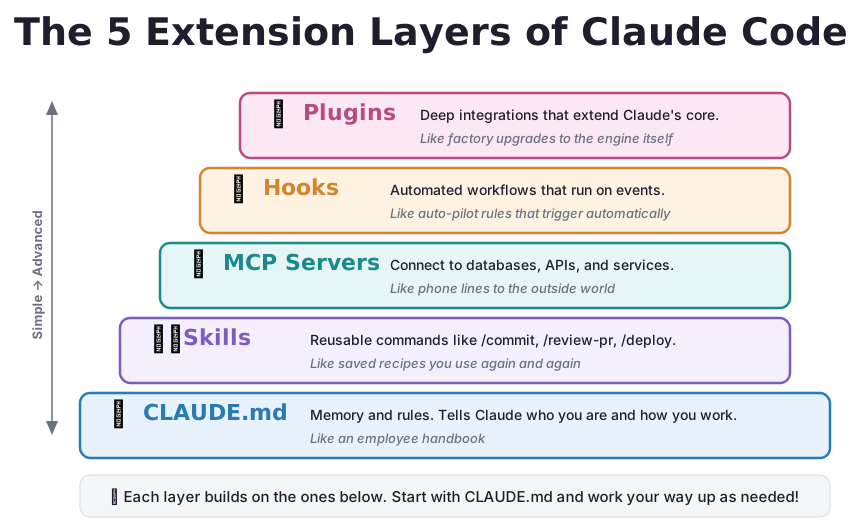
The 5 Layers, Visualized
Each layer builds on the ones below. Start from the foundation and work your way up.
1 of 5
CLAUDE.md: Custom Instructions
Markdown files that give Claude persistent context about your project.
Loaded automatically at the start of every session. No need to re-explain anything.
What goes in it?
- Tech stack & architecture
- Common commands (test, build, lint)
- Code conventions & style rules
- Project-specific patterns
Where to put it
./CLAUDE.md: project (shared)./CLAUDE.local.md: personal~/.claude/CLAUDE.md: global.claude/rules/*.md: modular
CLAUDE.md
Example
CLAUDE.md
# My App

## Tech Stack
TypeScript, React 18, PostgreSQL

## Commands
- `npm test`: Run tests
- `npm run dev`: Dev server

## Rules
- 2-space indentation
- Prefer const over let
- Always write tests
Path-specific rules
File: .claude/rules/api.md
---
paths:
  - "src/api/**/*.ts"
---

All API endpoints must:
- Include input validation
- Return standard error format
Rules only apply when Claude works on matching files.
Quick start: type /init in Claude Code to auto-generate one.
2 of 5
Skills: Custom Slash Commands
Markdown files that become reusable /commands.
You type /name and Claude follows the instructions in the file.
Where they live
Personal (all projects):
~/.claude/skills/name/SKILL.md

Project (shared via git):
.claude/skills/name/SKILL.md
Key options
user-invocable: you can call itdisable-model-invocation: only manualargument-hint: autocomplete hintallowed-tools: skip permissionscontext: fork: isolated sub-agent
Skills
Example: Code Review Skill
SKILL.md
---
name: review
description: Review code for bugs
user-invocable: true
argument-hint: "[file]"
allowed-tools: Read, Grep, Glob
---

Review the code for:
1. Bugs and logic errors
2. Security vulnerabilities
3. Performance issues

Suggest fixes for each issue.
Advanced: Dynamic Content
---
name: pr-review
context: fork
---

Review this PR:

# Shell output injected at runtime!
Diff: !`gh pr diff`
Files: !`gh pr diff --name-only`

Summarize and flag concerns.
!`command` runs the command and injects the output before Claude sees the skill.
Skills
Arguments & Variables
---
name: fix-issue
argument-hint: "[issue-number]"
---

Fix GitHub issue #$ARGUMENTS.
Read the issue, understand the problem, implement a fix.

# Usage: /fix-issue 123
# Claude sees: Fix GitHub issue #123.
| Variable | Value |
|---|---|
$ARGUMENTS | All arguments as a string |
$0, $1, $2 | Individual arguments by position |
${CLAUDE_SESSION_ID} | Current session ID |
!`command` | Output of a shell command |
Skills
300+ Ready-Made Skills
Skills are an open standard. Same format works across Claude Code, Gemini CLI, Cursor, Windsurf, and more.
Official
DOCX, PDF, PPTX, XLSX, Web Artifacts, Skill Creator, TDD, Playwright
Creative
Algorithmic Art, Canvas Design, Image Generation, Presentations, GIF Creator
Developer
Superpowers (20+ skills), 65 Full-Stack Skills, Git Worktrees, MCP Builder
Science
125+ Scientific Skills, 77 AI Research Skills, Materials Simulation, Health
Partners
Cloudflare, Google Labs, Hugging Face, Supabase, Notion, HashiCorp
Productivity
Brand Guidelines, Internal Comms, Twitter Optimizer, Reddit Research
Quick start: git clone https://github.com/obra/superpowers ~/.claude/skills/superpowers
Skills
Skills in Action
Superpowers Collection
20+ battle-tested skills: TDD workflows, /brainstorm, /write-plan, /execute-plan, debugging, and collaboration patterns.
Office Documents
Create and edit Word, Excel, PowerPoint, and PDF files. Fill forms, add charts, generate slides from prompts.
Cloudflare (6 skills)
Build AI agents, manage Workers/KV/R2, audit Web Vitals, and deploy with Wrangler from conversation.
VibeSec Security
OWASP Top 10 scanning, security checklists for 20+ languages. "If you build web apps, do yourself a favor."
Connect (500+ Apps)
Send emails, create GitHub issues, post to Slack, manage Notion. Real actions across 1000+ services.
Skill Seekers
Point it at any documentation website and it automatically converts it into a Claude skill. The skill that creates skills.
3 of 5
MCP Servers: External Integrations
Connect Claude to external tools, including databases, APIs, and SaaS platforms.
MCP = Model Context Protocol. A standard way for AI tools to talk to services.
Remote (cloud-hosted)
# GitHub
claude mcp add \
  --transport http github \
  https://api.githubcopilot.com/mcp/

# Then authenticate:
/mcp
Local (your machine)
# PostgreSQL
claude mcp add \
  --transport stdio mydb \
  -- npx -y @bytebase/dbhub \
  --dsn "postgresql://..."
MCP Servers
Popular Integrations
🐙
GitHub
PRs, issues, reviews, code search
🚨
Sentry
Error monitoring, stack traces
🗃
PostgreSQL
Query databases naturally
📝
Notion
Knowledge base access
💬
Slack
Messaging & notifications
💳
Stripe
Payment data & management
Sharing with your team (.mcp.json)
{ "mcpServers": { "github": { "type": "http", "url": "https://api.githubcopilot.com/mcp/" } } }
Commit .mcp.json to git → everyone on the team gets the same servers.
MCP Servers
The MCP Ecosystem
MCP servers exist for almost everything. 40+ categories and growing daily.
Creative & 3D
Blender, Figma, Maya, Unity, Excalidraw. Describe a scene and watch it build in real time.
Music & Media
Spotify, YouTube, text-to-speech. Control your soundtrack and content from conversation.
Physical World
3D printers, NVIDIA robotics, AutoCAD. AI that reaches beyond the screen into atoms.
Data & Knowledge
Obsidian, Knowledge Graphs, Notion. Your AI remembers context across sessions.
Museums & Culture
Met Museum (470K+ artworks), Smithsonian, Open Library. Explore humanity's collections.
Science & Niche
Orbital mechanics, healthcare FHIR, Kaggle datasets, handwriting-to-LaTeX, Anki flashcards.
MCP Servers
MCP Servers in Action
Blender MCP
Describe a 3D scene in plain English and watch Blender build it in real time. Create rooms, characters, animations.
Puppeteer
Full browser automation: navigate websites, fill forms, take screenshots, generate PDFs. A robot intern that browses for you.
3D Printer Monitor
Ask "how's my print?" and get live status, webcam snapshots, and remote control of your 3D printer.
Obsidian Vault
Link your AI to your notes. Query your second brain, search by tag, update notes, and build knowledge conversationally.
Pipedream (2,500+ APIs)
Connect to thousands of APIs with 8,000+ prebuilt tools through a single MCP. The swiss army knife of integrations.
Magg (Meta-MCP)
A meta-MCP that lets AI autonomously discover and install other MCP servers. Your AI extends its own capabilities on demand.
4 of 5
Hooks: Automated Triggers
Shell commands that run automatically when events happen.
Enforce rules, auto-format code, and send notifications, all without thinking about it.
| Event | When It Fires | Can Block? |
|---|---|---|
PreToolUse | Before Claude uses a tool | Yes |
PostToolUse | After a tool succeeds | No |
UserPromptSubmit | You submit a prompt | Yes |
Stop | Claude finishes responding | Yes |
SessionStart | Session begins | No |
Notification | Permission prompt appears | No |
Blocking: exit code 0 = allow, exit code 2 = block the action.
Hooks
Practical Examples
Auto-format after edits
"PostToolUse": [{
  "matcher": "Edit|Write",
  "hooks": [{
    "type": "command",
    "command": "jq -r '.tool_input.file_path'
      | xargs prettier --write"
  }]
}]
Block editing .env files
"PreToolUse": [{
  "matcher": "Edit|Write",
  "hooks": [{
    "type": "command",
    "command": "jq -r '.tool_input.file_path'
      | grep -q '.env'
      && exit 2 || exit 0"
  }]
}]
Desktop notification
"Notification": [{
  "matcher": "permission_prompt",
  "hooks": [{
    "type": "command",
    "command": "osascript -e
      'display notification
      \"Claude needs attention\"'"
  }]
}]
Log all bash commands
"PostToolUse": [{
  "matcher": "Bash",
  "hooks": [{
    "type": "command",
    "command": "jq -r '.tool_input.command'
      >> ~/.claude/cmds.log"
  }]
}]
5 of 5
Plugins: Shareable Extension Packs
Bundle skills + hooks + MCP servers + agents into one distributable package.
Plugin structure
my-plugin/
├── .claude-plugin/
│   └── plugin.json    ← manifest
├── skills/
│   └── review/SKILL.md
├── agents/
│   └── analyzer.md
├── hooks/
│   └── hooks.json
└── .mcp.json          ← integrations
Minimal manifest
{
  "name": "my-plugin",
  "description": "What it does",
  "version": "1.0.0"
}
Test locally:
claude --plugin-dir ./my-plugin

# Skills are namespaced:
/my-plugin:review
Plugins
When to Use What?
| Situation | Solution |
|---|---|
| Customizing one project | Standalone: .claude/skills/, .claude/settings.json |
| Your personal workflows | Personal: ~/.claude/skills/ |
| Share with your team | Plugin |
| Publish to the community | Plugin + marketplace repo |
| Versioned releases | Plugin |
Plugin commands
/plugin                  # Browse marketplace
/plugin install          # Install
/plugin enable name      # Enable / disable
/plugin uninstall name   # Remove
Bonus
Settings & Permissions
Control what Claude can and can't do in .claude/settings.json:
Permission rules
{
  "permissions": {
    "allow": [
      "Bash(npm run *)",
      "Bash(git *)",
      "Read(./src/**)"
    ],
    "deny": [
      "Bash(rm *)",
      "Read(.env*)"
    ]
  }
}
Settings file priority
| 1. | .claude/settings.local.json | personal |
| 2. | .claude/settings.json | team |
| 3. | ~/.claude/settings.json | global |
Interactive setup: type /config
Cheat Sheet
| I want to... | Use | How |
|---|---|---|
| Tell Claude about my project | CLAUDE.md | /init |
| Create a reusable command | Skill | .claude/skills/name/SKILL.md |
| Connect to GitHub / DB / API | MCP | claude mcp add ... |
| Auto-format after edits | Hook | PostToolUse in settings.json |
| Block dangerous commands | Hook | PreToolUse with exit 2 |
| Allow npm test always | Settings | "allow": ["Bash(npm test *)"] |
| Share config with team | Plugin | .claude-plugin/plugin.json |
| See what's loaded | Commands | /memory /mcp /config |
Getting Started
Start simple
- Run
/initto create a CLAUDE.md - Add one MCP server you use daily
- Create one skill for a repetitive task
Scale up later
- Add hooks for formatting & protection
- Use
.claude/rules/for organized guidelines - Bundle into a plugin for your team
Start with what solves a real problem today.
You don't need all 5 layers. Most teams start with CLAUDE.md + one or two skills.
Thank you
Customizing Claude Code